Folder-level permissions allow administrator to control who can access folders and what actions they can perform on documents withing those folders.
Permissions can be assigned to individual users or groups, ensuring flexible and scalable access control.
- Access Path
- Navigate to the desired Folder or Subfolder.
- Click Folder Options.
- Select Permissions.
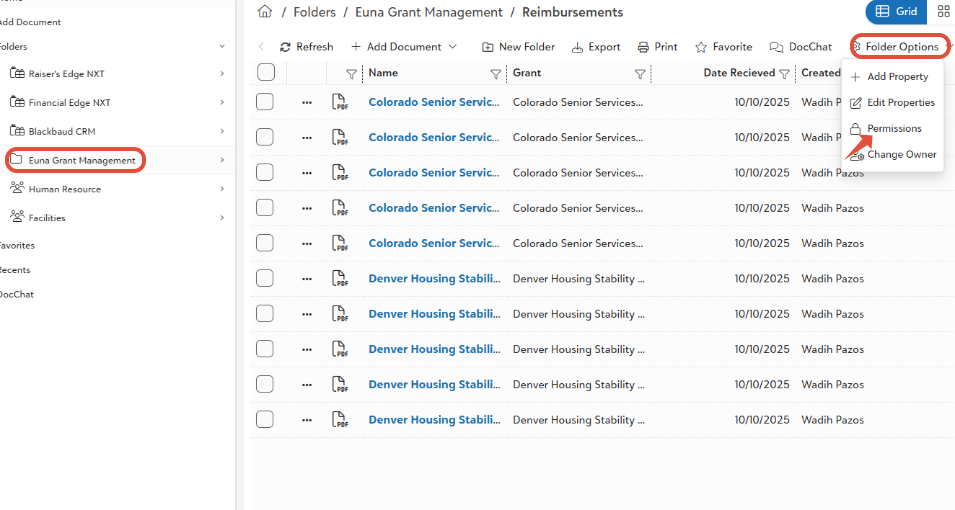
- Permissions can be assigned to:
- Individual Users
- Groups
- Access Rights Configuration
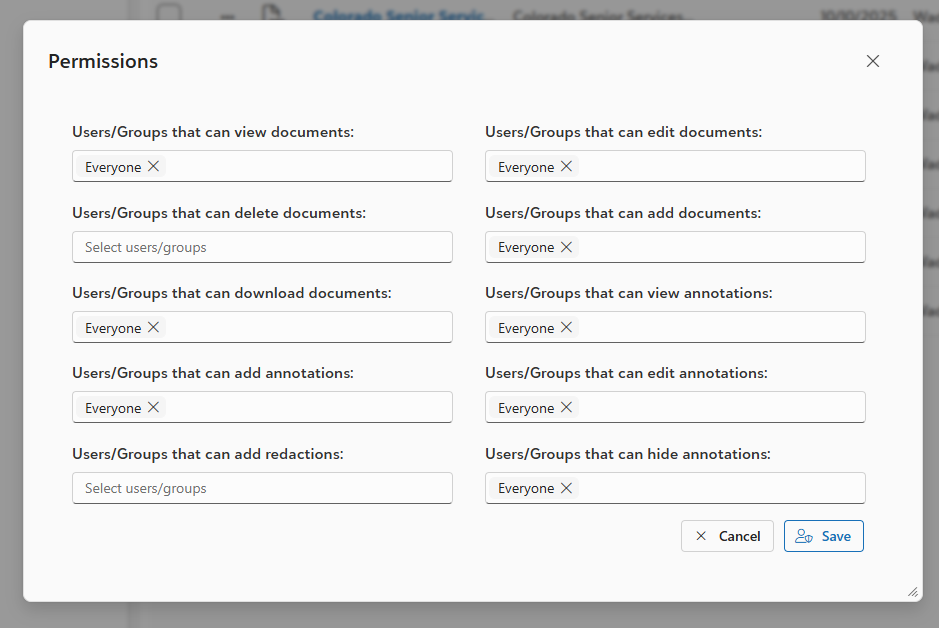
- For each selected User or Group, administrators can configure specific access rights.
- Document-Level Permissions
- These permissions control actions that can be performed on documents within the folder
- View Documents
- Allows users or groups to view documents stored in the folder.
- Edit Documents
- Allow permanent deletion of documents content or document properties.
- Delete Documents
- Allows permanent deletion of documents from the system (with confirmation).
- Add Documents
- Allows users to upload, scan, or create new documents in the folder.
- Download Documents
- Allows users to download documents from the systems.
- Annotation-Level Permissions
- These permissions control actions related to document annotations and markup.
- View Annotations
- Allows viewing of comments, highlights, or markup to documents.
- Add Annotations
- Allow users to add comments or markup to documents.
- Edit Annotations
- Allows users to modify existing annotations.
- Add Redactions
- Allows users to apply redactions to hide sensitive content.
- Hide Annotations
- Allows users to hide annotations during document viewing.
- Permission Assignment Behavior
- Permissions are assigned per folder or subfolder.
- Different folders can have different permissions.
- Group permissions apply to all members of the group.
- If a user belongs to multiple groups, the combined permissions are applied.
- Folder-level permissions override general access when restrictions exist.
- Validation Rules – Folder Permissions
- At least one user or group must be selected before assigning permissions.
- Duplicate permission entries for the same user/group are not allowed.
- Unauthorized users cannot modify permissions.
- If user does not have view rights:
- Folder and documents will not be visible.
- Permission Hierarchy & Control
- Administrators can configure and modify permissions.
- Regular users cannot modify permissions unless explicitly granted.
- Ownership changes may affect permission management capabilities.
- Permissions must be saved before they take effect.
- Confirmation & Error Handling
- Changes require clicking Save.
- Deletion of permissions requires confirmation.
- Invalid selections are blocked with clear error messages.
- System prevents unauthorized access attempts.
Was this article helpful?
That’s Great!
Thank you for your feedback
Sorry! We couldn't be helpful
Thank you for your feedback
Feedback sent
We appreciate your effort and will try to fix the article